Mysterious Files PH

Friday, April 3, 2026

Burning Wood to Brew Wood to Preserve Wood : Pine Tar

April 03, 2026 0

Before there was pressure-treated wood, before modern paints, there was pine tar. Everything from tool handles to wagons to ships were made of wood preserved with pine tar, once upon a time, and [woodbrew] wants to show you how to make it, how to use it, and why you might put it on your skin.

It starts with, you guessed it, pine! In the first part of the video, [woodbrew] creates a skin salve with pine resin and food-safe oil. The pine resin–which is the sticky goop that dries around wounds on evergreen trees–is highly antiseptic and has been used in wound salves since the stone age. The process is easy: melt it in a double boiler, then mix with equal parts oil. [woodbrew] also adds a touch of beeswax to firm it up, an a little eucalyptus extract for extra germ-killing power, and a nice smell to boot.

That’ll preserve your hands, but what about preserving wood?  That starts at about 9 minutes in, and for that you’re going to need a lot more resin, so picking it off wounded trees like he does at the start of the video won’t work. [woodbrew] suggests starting with dead-or-dying pines, and harvesting the crooks of their branches for “fatwood” — wood with the highest resin content. He also suggests the center of stumps, again of trees that died or were severely injured before being cut down. Then it’s a matter of cooking those fine organic molecules out. This is where we burn the wood to save the wood. Well, to save other wood. Wood we didn’t burn, obviously.

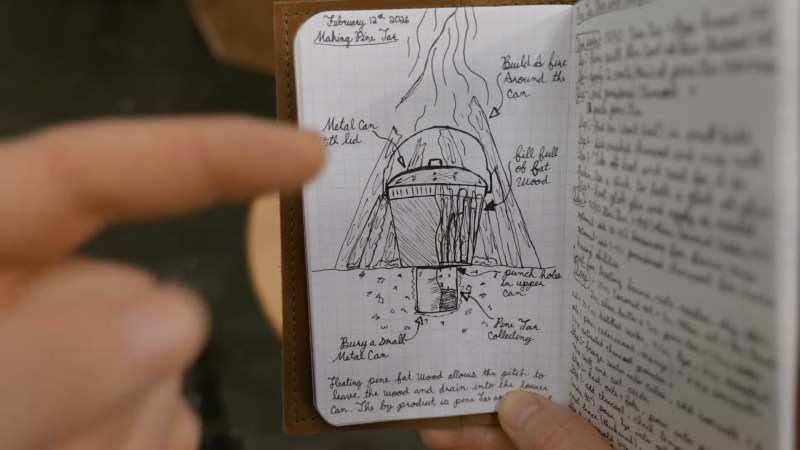
The distillation process [woodbrew] uses it fairly traditional, and consists of a couple of buckets. One bucket is buried and collects the pine tar; the other, with holes in the bottom to allow the tar to drip out, is filled with fatwood and covered tightly before being surrounded by firewood which is set alight. You could use an alternate source of heat here, but if you just cut down a pine tree for its fatwood, well, you’d have the rest of the tree to work with. Inside the fatwood bucket, the heat of the fire cooks off the volatile compounds that make pine tar, while the lack of oxygen from being closed up keeps it from burning. Burying the collection bucket keeps it from getting so hot the volatiles all boil off.

If this sounds like the process for making charcoal or woodgas, that’s because it is! He’s letting the gas fraction flare off here, but you could probably capture it– though a true gasifier brakes the tar down into gaseous compounds as well. The charcoal of course stays in the bucket as a bonus.

To make it usable as a wood finish, [woodbrew] mixes his homemade pine tar 50:50 with linseed oil, thining it to a spreadable consistency that helps it penetrate deep into the wood. By filling the voids in the wood, this mixture will help keep moisture out, and the antiseptic properties of the organic soup that is pine tar will help keep fungi at bay for potentially decades to come.

Thanks to [Keith Olson] for the tip!


For Such a Small Program, ZX81 1K Chess Sure Packs a Lot In

April 03, 2026 0
For Such a Small Program, ZX81 1K Chess Sure Packs a Lot In

The Sinclair ZX81 was hardly the most accomplished of 1980s 8-bit microcomputers, but its ultra-low-budget hardware was certainly pressed into service for some impressive work. Perhaps the most legendary piece of commercial software in this vein was 1K Chess, which packed an entire chess engine into the user-available bytes in the unexpanded 1K ZX’s memory map. [MarquisdeGeek] has taken this vintage piece of code in 2026 and subjected it to a thorough analysis, finding all the tricks along the way.

Though hackers have since found ways to trick the ’81 into displaying bitmap graphics, using it as intended is text-only with some limited block graphics. The chess board then is text-only, and its illusion of “thinking” about moves comes courtesy of the on-screen board doubling as the play area memory. In the GitHub repository you can find decompiled and annotated versions as well as the original ZX binary, with as a bonus a screen capture of the game as it appears as BASIC with the ZX’s odd means of storing Z80 code in REM statements.

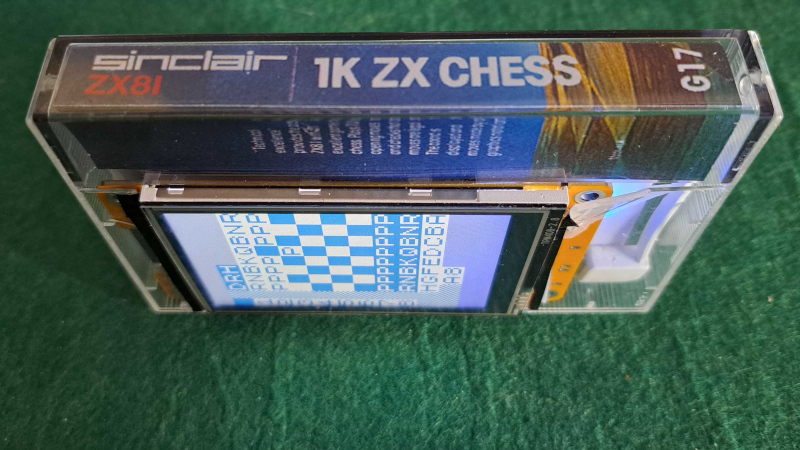
If that wasn’t enough, in his note giving us the tip he reveals that much of the work was done in a ZX emulator running in a Dragon emulator, and gives us a fun glimpse of the game running in an emulator on a Cheap Yellow Display inside 1K Chess cassette box. We like it, a lot!

If you need a greater ZX81 fix, take a look at how this machine chased the beam to make TV graphics on the cheap.


Hackaday Podcast Episode 364: Clocks, Cameras, and Free Will

April 03, 2026 0
Hackaday Podcast Episode 364: Clocks, Cameras, and Free Will

This week, Hackaday’s Elliot Williams and Kristina Panos met up over assorted beverages to bring you the latest news, mystery sound results show, and of course, a big bunch of hacks from the previous seven days or so.

In the news, there’s quite a bit to talk about. Regarding Hackaday Europe, you can rest assured that the talks will be announced soon. The Green-Powered Challenge is still underway, and we need your entry to truly make it a contest. You have until April 24th to enter, so show us what you can do with power you scrounge up from the environment!

As usual, we published a handful of April Fool’s posts, which you may or may not find amusing. And finally — no fooling — our own Tom Nardi wrote up the Artemis moon launch, and is going to update the post every day until the mission ends.

On What’s That Sound, we can score one for Kristina, which brings her record to approximately three wins and sixty-eight losses. She knew without a doubt that the dialogue was from the Day the Earth Stood Still (1951). Oh, what? There was a remake in 2008? Kristina should get bonus points, then.

After that, it’s on to the hacks, beginning with the basics of making clean enclosures that are decidedly not 3D-printed, a couple of sweet lo-fi cameras, and a nice way to tame the tape when it comes to SMT parts. We also discuss a clock that marks time in a mathematical way, watch an electro-permanent magnet in action, and improving soda by turning it into mead. Finally, we discuss the solar balconies taking Europe by storm, and Copilot’s terrifying terms of service.

Check out the links below if you want to follow along, and as always, tell us what you think about this episode in the comments!

Download in DRM-free MP3 and savor at your leisure.

Episode 364 Show Notes:

News:

What’s that Sound?

  • Congrats to [Phil] who knew this was dialogue from the Day the Earth Stood Still (1951).

Interesting Hacks of the Week:

Quick Hacks:

Can’t-Miss Articles:


Fixing an E-Waste ASUS P5A-B Socket 7 Mainboard

April 03, 2026 0

A fun part of retro computing is saving ‘e-waste’ that was headed for certain destruction. These boards can have any number of defects, modifications and more that have to be remedied prior to using them. In the case of the Asus P5A-B Socket 7 mainboard that [Bits und Bolts] rescued from the scrapheap at least one issue was obvious: someone had ripped off the plastic part of the ZIF socket, leaving only the metal pins poking out like an awkward kind of LGA socket.

In addition to the busted PGA ZIF socket there was additional damage, including a broken SMT capacitor and missing resistor. Interestingly, someone had apparently modded the ATX power connector to permanently power on the system by removing a pin and bridging to the power-on signal. Obviously this mod had to be undone by removing the bridge and installing a new pin. After this cracked solder joints had to be addressed, before the tedious task of removing the stray PGA socket pins one by one started.

Exactly what was done to this mainboard and why will likely forever remain a mystery, but at least there didn’t seem to be any serious damage. After installing a CPU it was possible to boot and access the BIOS as well as run a couple of tools, confirming that one more Socket 7 board has been saved from the scrapper.


Thursday, April 2, 2026

The Threadless Ball Screw Never Took Off, But Don’t Write It Off

April 02, 2026 0

If you’ve never heard of the threadless ball screw, which was invented over sixty years ago, [Angus] of Maker’s Muse has a video demonstrating the whole thing, covering its history and showcasing both its strengths and weaknesses. If you like seeing mechanical assemblies in action, give it a watch.

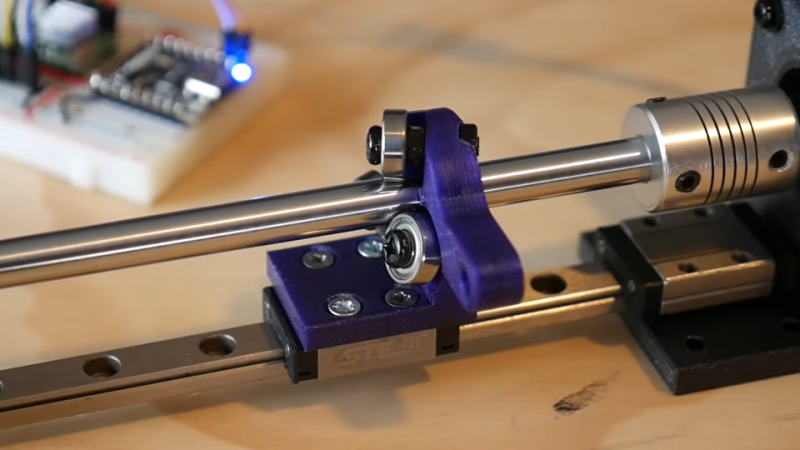
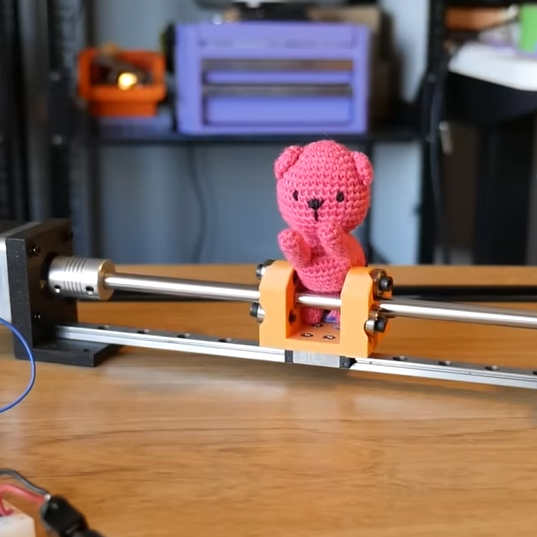
The device — consisting of little more than a smooth rod and three angled ball bearings — is a way to turn rotational motion into linear motion. Not a single belt, thread, or complex mechanical assembly in sight. While a simple nut on a threaded rod can turn rotation into linear motion, those come with their own issues. The threadless ball screw was one effort at finding a better way.

While it lacks precision, the threadless ball screw nevertheless offers quiet and smooth motion with adjustable tension in a very DIY-friendly design.

Threadless ball screws never really took off, although they were given some consideration for use in 3D printers back in the RepRap days. Today one can purchase quality CNC components without leaving one’s web browser, but back in the early 2000s things like lead screws and ball screws were rather more specialized, less accessible, and more expensive than they are today. RepRap folks had to make their own solutions. But while the threadless ball screw is a very DIY-friendly design, it was ultimately lacking in performance.

The main problem is they’re just not precise enough for anything like CNC work. [Angus] does some back-and-forth tests with a 3D printed unit that shows serious drift after only a few minutes. Now, he knows perfectly well that his 3D-printed test unit is far from ideal, but the rapidity at which it drifted was still a surprise. Making a carriage with two threadless ball screws — one at each end — performed a lot better, but was ultimately still flawed.

It’s not all bad. There’s zero backlash. They are mechanically simple, remarkably smooth, and utterly quiet. Also, [Angus] discovered that the maximum force this setup can be made to apply is surprisingly significant, and is directly related to the tension on the bearings. That means one can trivially adjust how easily the carriage slips  (or doesn’t) just by tightening or loosening the screw holding each bearing.

Sure, they’re not precise. But maybe you don’t need precision. Maybe you just need to move something back and forth in a strong & silent sort of way that can still slip gracefully (and quietly) if something goes awry, like bottoming out an axis. 3D printing makes it pretty easy to whip one up, so maybe there’s still a place for the threadless ball screw.


Windows 3.1 on a Modern AM5-Based PC is Surprisingly Usable

April 02, 2026 0

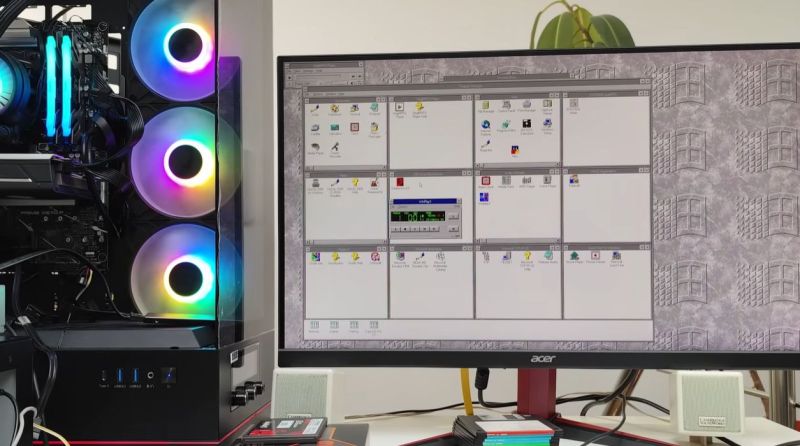
Although Windows 95 stole the show, Windows 3.0 was arguably the first version of Windows that more or less nailed the basic Windows UI concept, with the major 3.1 update being quite recognizable to a modern-day audience. Even better is that you can still install Win3.1 on a modern x86-compatible PC and get some massive improvements along the way, as [Omores] demonstrates in a recent video.

The only real gotcha here is that the AMD AM5 system with Asus Prime X670-P mainboard is one of those boards whose UEFI BIOS still has the ‘classic BIOS’ Compatibility Support Module (CSM) option. With that enabled, Win 3.1 installs without further fuss via a USB floppy drive from a stack of ‘backup’ floppies that someone made in the early 90s. [Omores] also tried it with CSMWrap, but with this USB to PS/2 emulation didn’t work.

Windows 3.1 supports ‘enhanced mode’ by default, which adds virtual memory and multi-tasking if you have an 80386 CPU or better. To fix crashing on boot and having to use ‘standard mode’ instead, the ahcifix.386 fix for the responsible SATA issue by [PluMGMK] should help, or a separate SATA expansion card.

For the video driver the vbesvga.drv by [PluMGMK] was used, to support all VESA BIOS Extensions modes. This driver has improved massively since we last covered it and works great with an RTX 5060 Ti GPU. There’s now even DCI support to enable direct GPU VRAM access for e.g. video playback, with audio also working great with only a few driver-related gotchas.


Sega Meganet: Online Gaming In 1990

April 02, 2026 0

It’s easy to think of online console gaming as an invention of the 2000s. Microsoft made waves when Xbox Live dropped in 2002, with Nintendo and Sony scrambling to catch up with their own offerings that were neither as sleek or well-integrated.

However, if you were around a decade earlier, you might have experienced online console gaming much closer to the dawn of the Internet era. As far back as 1990, you could jump online with your Sega Mega Drive. But what did an online console feel like in the dial-up era?

Mega

The Sega Mega Drive was launched in Japan in October 1988. The company was in a tough battle with Nintendo for gaming dominance, and the new 16-bit console was intended to best its rival’s offerings across the board. With a forward-looking attitude, Sega quickly developed an online offering for the console, which went under a few different names. It was known as Mega Net, or alternatively, the Sega Net Work System.

The Mega Modem plugged into the back of the Model 1 Mega Drive. With data rates maxing out at 1,200 bps, it was somewhat limited in what it could offer. Credit: boffy_b, CC BY-SA 3.0

The system hit the market on November 3 1990, exclusively for the Japanese market, with Sega talking up a future launch in the US under the “Tele-Genesis” name. The initial Mega Net kit cost ¥12,800, which included the Mega Modem accessory—a simple 1,200 bps dial-up modem which plugged into the “EXT” DE-9 port on the back of the Model 1 Mega Drive. Access to Mega Net service came at a cost of ¥800 a month. Users got a copy of Nikkan Sports Pro Baseball VAN, which provided live updates and statistics on baseball matches when connected to the service.

The Mega Net pack also included the “Game Library” cartridge. This allowed users to dial up to Mega Net and play a variety of downloadable games. These titles had to be incredibly compact, usually under 128 KB. This was both because of the glacially slow 1,200 bps modem, and because the Mega Drive had no real storage capability to speak of. 42 games were released on the system, and titles would take about 5 to 8 minutes to download. The vast majority were single player experiences. However, two games – Tel-Tel Stadium and Tel-Tel Mahjong – featured online play via Mega Net. Perhaps unsurprisingly, both games were turn-based—a practical necessity given the limited speeds and latency achievable with the slow Mega Modem. A handful of games from Mega Net would later see cartridge releases of their own.

Users could also engage in multiplayer gaming with certain cartridge-based titles. However, this was not using a server-based online system. Instead, this merely consisted of point-to-point dial-up play between two consoles equipped with the Mega Modem.

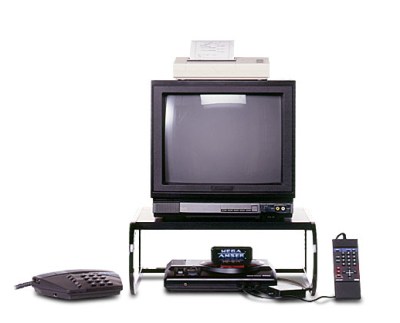
The Mega Anser kit allowed you to manage your banking or life insurance from the comfort of your living room. The optional thermal printer could be used to print statements or receipts. Credit: Sega

Mega Net wasn’t just limited to gaming, however. Sega explored more utilitarian uses for the Mega Drive with the release of Mega Anser. This came as a package that included the Mega Modem, the Mega Anser software, and a numeric keypad controller called the Ten Key Pad. There was also an optional printer that plugged into one of the controller ports. The most notable use of the Mega Anser was for online banking. Depending on your bank, you could manage your funds with the Naisu-kun Mini, Osaka Ginkou no Home Banking Service My Line, or Sumisei Home Tanmatsu.

Unfortunately, the technology wasn’t quite there in 1990 to support a fully-vibrant online gaming service. By 1992, Sega realised there wasn’t a large market for Mega Net and Mega Anser services, and the hardware started turning up in bargain bins for drastically reduced prices. By 1993, Sega had released a remodelled Mega Drive which eliminated the EXT port required for the Mega Modem, making it clear that there was no interest in taking the service any further.

You could use the Mega Net system to access live baseball scores and statistics, though one wonders if it might not have been easier to just watch a televised match instead. Credit: Sega

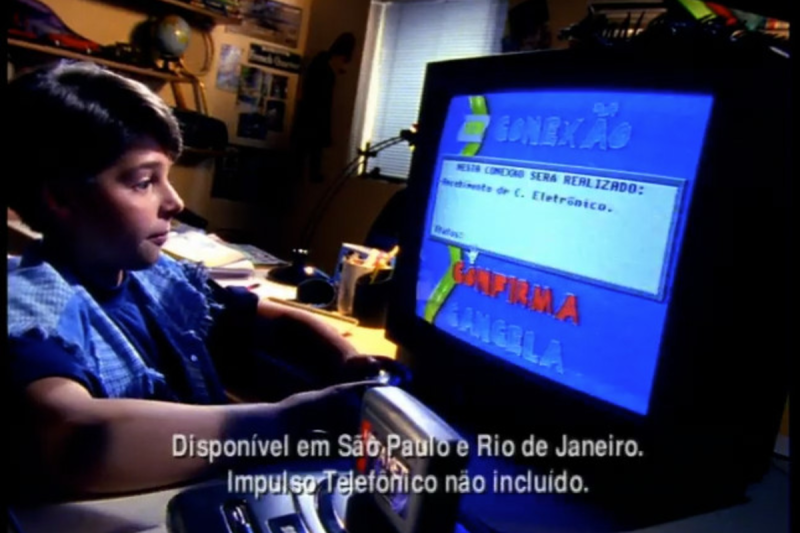
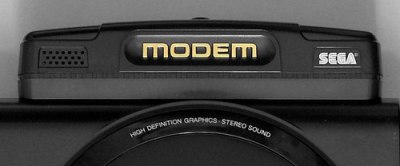
The end of Mega Net in Japan was swift, but the name would live once more. That time came in 1995, when a similar service saw a last gasp release in Brazil, of all places. Supported by local distributor Tectoy, it ran using a unique modem accessory that plugged into the cartridge slot. The range of services on offer was quite different—users could access emails, fax messages, and read an electronic magazine called Revista Eletrônica. The system was designed to be used with the Sega Mouse for a more computer-like interface experience, and prices started at R$5 a month for access to the service. The service was, in many ways, completely unrelated to the original Sega effort, but was inspired by it and wore similar branding.

Brazil’s Mega Net was more modern and had additional ways for users to interact with each other.

Sega’s early experiment with online console gaming was not a grand success. It failed to attract a huge user base or offer any ground-breaking features. However, it did give the company a base to work from when it came to getting later consoles online, like the Saturn and Dreamcast that arrived years later. Ultimately, Sega would largely be out of the console market by the time online gaming really took off in that world, but you can’t fault the former Japanese titan for trying to get in early.